Workflows
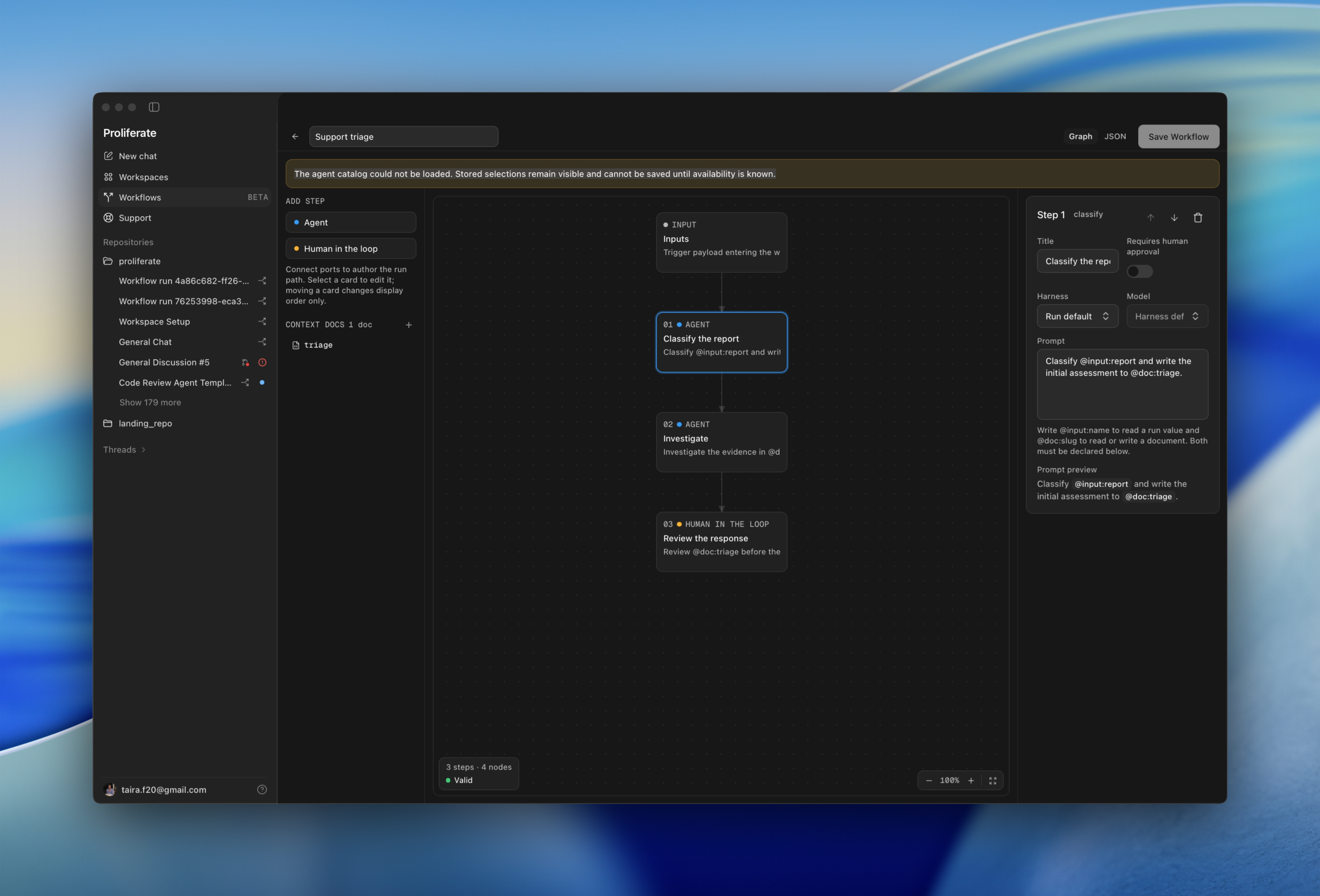
A saved chain of agent and approval steps that runs top to bottom in one workspace.
A workflow turns a procedure you keep repeating — triage this, implement it, review it, ship it — into something you can start with one press and watch as it runs.
What is a workflow
A workflow is a linear chain of steps that runs top to bottom in one workspace. Each step is one of two kinds:
| Kind | What it does |
|---|---|
| Agent | Opens a session, runs its prompt, and moves on when it finishes. |
| Human in the loop | Stops the run and waits for you to approve. |
The chain is linear on purpose. Saving requires one path that covers every step you have added, so there is always exactly one answer to "what runs next".
One session per node
Every agent step is an ordinary Proliferate session, titled with its position in
the chain (03 Implement). You can open it mid-run, read the transcript, and
chat with the agent while the run is in flight.
This is what makes a workflow debuggable. There is no opaque job to inspect afterwards; there are sessions, and they are the same sessions you use every day.
Inputs and context documents
Two mechanisms carry information through a run.
Inputs are values someone fills in when the run starts. A prompt reads one
as @input:name.
Context documents are how one step hands work to the next. You declare a
document, pick the step that writes it, and any prompt can reference it as
@doc:slug.
At run time each document becomes a real file in the workspace, under
.proliferate/context/<run-id>/. Steps read and edit them like any other file,
and the folder is excluded from git, so drafts never land in a diff.
How Proliferate runs workflows
A run is driven by a transition table rather than by whichever step happens to be talking. Every step's prompt envelope is stored as it was actually sent, and the run's state is written before anything acts on it.
That is what keeps the interactive parts honest:
- Approve releases the run to the next step.
- Fail & redo fails a step and starts a fresh attempt in its place, with the prompt you edit at that moment.
- Side nodes run an extra prompt alongside the chain without blocking it.
- Pause and resume stops the run where it is; restarting Proliferate leaves paused runs exactly where you left them.
Because the record is what happened rather than what was planned, a redone step and an approved step read differently after the fact.
New worktree vs repo root
You choose where a run works when you start it.
| Placement | Use it when |
|---|---|
| New worktree | You want the run isolated from your other work. This is the usual choice. |
| Repo root | The run needs the existing checkout. |
A run holds its workspace for its whole life. Pick the placement that matches what the last step needs, not just the first.